Showing posts with label collaboration. Show all posts

  • Thanks Steve! Webinars for Free Published 2009-07-13 under , , ,

    vRoom by LearnCentral.org Steve Hargadon has lead me to another wonderful tool for educators.

    Steve Hargadon - of EduBloggerCon and Classroom 2.0 fame - has been busy. Perhaps you saw him at NECC this year - NECC UnPlugged - or maybe you attened one the many PBS Teachers free webinars ("PBS Teachers LIVE!") or you just know him as the "Open Source Guy". He certainly gets around.

    In addition to being a really nice guy, Steve has (and continues to be) a great source for new technologies and innovative uses of technology within education. Some of the "gems" that I discovered through Steve include Ning, UStream, and CoMapping. His most recent "gem" is a program that allows teachers to host webinars in Elluminate - for FREE. Steve has worked out a deal that gives you the opportunity host your own "public meetings" or online seminars in LearnCentral's Elluminate Room. There are few "rules" and restrictions including that the topic focus on education, it be available to everyone (for free), and that your are OK with it being recorded. This service usually costs lots of $$$'s and thanks to Steve and Ellumniate, you can get it for free. You can read more about it on the LearnCentral site and in Steve's blog.

    But what if you are looking to use something like Elluminate to meet online with a just one or two folks - in a more private setting? Again, Steve (and LearnCentral) has a solution. If you join LearnCentral (free), you can use their vRoom feature to host a private Elluminate meeting with one or two others. Think collaborative teaching, online tutoring or virtual parent conferences. (some vRoom stories).

    We have been using GotoMeeting's online meeting service for a number of years now - and paying around $50 a month for the privallege. While GotoMeeting lies somewhere between the "open to all - free" model and the "private - one or two participant" vRoom model, it is good to know that there are other options out there.

    Thanks Steve and keep up the good work!

  • Oh - I remember YackPack Published 2009-06-30 under , ,

    yackpack Another look at a fun/interesting/useful tool - YackPack

    With all the cool technology out there, how do you keep up with it all?

    The answers is you don't. You only keep up with that technology that you use. The phrase "Use it or loose it" really applies here.

    Back in 2007, I gave a presentation at the CUE conference and just before going into the session, I ran into a woman from YackPack. I did not have too much time to hear the YackPack story, but she was willing to give me one of their really cool t-shirts after I promised to include in in the give-aways at my session. (I think the t-shirt was more popular than my presentation). I did, however, learn more about YackPack when I got home and was really impressed. You can read my post about incorporating YackPack into PBWiki PBworks.

    So... what's the point? Despite the uses of YackPack, I never incorporated them into my teaching or training. I didn't use it, so I lost it.

    Jump forward to NECC 2009. Since I was not able to go to D.C. :-( I have been following the conference virtually. One participant in particular, elkanj, has bookmarked several interesting links on Delicious from NECC, and YackPack was one of them.

    "Oh, YackPack. Let's have another look." [imagine a little bubble with this thought above my head]

    I am so glad that I did. In general - YackPack is a web-based asynchronous conference calling application. WHAT DOES THAT MEAN? Let me try and answer with some scenerios

    • You are a language teacher who is looking for a way to get your students to practice conversations
      yackpack: create a group with all your students and have them converse. They send other students (you can assign pairs if you want) voice "messages" in the foreign language and the recipients respond.
    • You have always wanted to schedule individual conferences with your students to review their progress but found coordinating meeting times was very difficult.
      yackpack: create a group with all your students and record a review for each student individually. Students login and hear your review and respond. You don't have to be at school. You do it on your time. The students do it on their time. All of the conversations are saved. And it is private.
    • You have tried blogging with your students as a way to engage them in out-of-class discussions, and you have had some success. But the kids with who don't write as well as the others feel intimidated.
      yackpack: create a group with all your students and record discussion prompts aimed at the whole group. Each student responds to the group and a conversation begins. This gives the students a chance to articulate their thoughts verbally. As an alternative, you could ask each student to respond directly to you to gauge their level of understanding on a topic.
    • You have a few friends who are experts in their fields and are really interesting. You would love to have them come to your class and share their experiences with the kids, but you can't afford the class time.
      yackpack: create a group with all your students and invite your friends to join where they record a short talk on their experiences. Your students can then engage them in discussions.

    YackPack has more information about using their technology in the classroom here. To get started, watch this video preview of YackPack.

    If you have never heard of YackPack or are like me and have not Yacked in a while, check it out. There are lots of interesting uses for this technology.

  • Ready to Throwout Email? Published 2009-06-01 under , , ,

    google wave Most of us are tied to email. What would you say if I told you that Google has made email passe? Well, prepare to toss Outlook, Gmail and your traditional email.

    I was unable to make the Google I/O conference in San Francisco due to a last minute scheduling conflict but as a paid participant, I received all of the conference emails including one titled "In case you missed the keynote this morning...". The email included a link to a video of the keynote. The topic was Wave, a new model for collaboration. Sounds interesting, so I clicked.

    Let me back track a bit. I have been using Google's "stuff" for a while. I have attended and lead workshops on Google Docs. I have written gadgets that utilize the Google Search API as well as Google Visualization. I am trying to convince you of my "Google Expertise" but more that I feel as if I am fairly well acquainted with Google's tools and Internet applications in general. I hope this helps frame my comments below.

    Back to the keynote. I clicked the link and was introduced to something called Wave which was going to transform email as we know it. I reacted with skepticism. I just could not imagine how any changes to email could be "transformational". Boy was I wrong!!! I sat riveted to the video. People around me could hear the frequent "Oh my gosh!", "How cool", and "That is amazing" from me. Wave will truly make email as we know it obsolete. As I suggested above, I am not prone to such grandiose statements. But Wave deserves it!

    Don't take my word. You need to watch the keynote. Let me know what you think!

  • The Zen of Cutting Paper Published 2009-03-25 under ,

    peace Given the choice of clip art or scissors with construction paper, which would you choose to create your next presentation? Read on to hear the story of one presentation where this technologist decided to go "unplug".

    You are asked to create a presentation on 21st Century Skills to be given to the school board next week. Your first step ... sit down at the computer, fire up PowerPoint or Keynote and get stared! OK, we are educators. We know that this approach is a bit hasty. We need a plan.

    Being the presentation guru, you outline the goals of the presentation and key points that you want to convey to your audience. You then outline the approach - decide what you are going to say. Finally you think about the content remembering that each slide (the visuals) should enhance what you are saying.

    After you have the plan, you return to your computer and begin crafting the presentation. This is where I took a different path in a recent presentation. Normally I follow my traditional method - opening Fireworks, developing a visual template, and filling each page/slide with text/images according to my outline. [note: I use Fireworks instead of Powerpoint as it gives me better control and more options. When done, I usually output the file as a PDF.]

    This time, I took a few of my daughter's coloring books (with permission of course) and found images consistent with my plan. I cut these images out and glued them to pieces of large construction paper. The process of cutting and gluing was much more satisfactory than moving the mouse around the screen. It also allowed me to enlist the help of my daughter - her condition for using her coloring book. I had a great time working with her and the end product was unique. The presentation went over really well and they all loved my "mystery slide" that I through in. It was the page Ruby constructed on her own with her favorite pictures. While it did not tie directly into the topic, it was a source for humor as the audience tried to guess its relevance.

    The next time you give a presentation, or better yet, you assign your kids to create a Powerpoint, consider the low tech solution. We did this in a recent tech ed forum and the results were fantastic.

  • Developing Your Delicious Network Published 2009-03-19 under , ,

    delicious man Social networks are wonderful, but how do you develop one? This post looks at ideas for adding to your network of Delicious users - you will be surprised what you find.

    Do you have a Delicious Network? You know, a network of Delicious users that you follow to see what wonderful things they are bookmarking. What? You don't! Well - you are in for a treat.

    Note: if you are new to Delicious and social bookmarking, read my earlier post: What is Delicious?

    Delicious - the social bookmarking site - has a feature called your Network where you select other Delicious users to follow. When you go to your Network page on Delicious.com you will see a list of the most recent bookmarks created by folks in your network. Remember, really smart people surround themselves with even smarter people. Your Delicious Network is a place where you can piggyback on the smarts of others.

    Here is my network. These folks represent learners that I respect and I can't tell you how many ideas and resources that I have gotten from the bookmarks created by my network. Someone recently asked how I keep up to date on some much that is on the web. My Delicious Network!

    During my presentation on use of Delicious as a tool for educators at the 2009 CUE Conference, I was asked how I developed my Delicious Network. The short answer is that I don't really remember how I got started (it was a while ago). But this got me thinking: how does one develop a social network?

    Here are a few ideas that I can share (one actually is not mine) and I would love to hear of your ideas.

    Vicki Davis Online
    • From Blogs As you read your favorite blogs, look for the author's Delicious user name. For example, Vicki Davis - aka CoolCatTeacher is known as brightideasguru. (see image to right)
    • Referrals Take a look at who other Delicious users have in their network. If you look at Will Richardson's network, you will have a list of hundreds of folks to follow. (Actually, he only has 55 in his network)
    • Explore - Look for Fans As mentioned, Will follows 55 folks in his network. But there are over 1000 others that are fans of Will. These are delicious users who have added Will to their network. Clicking on their name will give you a list of their bookmarks. If you find someone interesting - that is someone that bookmarks regularly and has similar tastes in topics - add him/her to your network.
    • Reverse Engineer Go to Delicious and search for a topic of interest - say "calculus visualization". Be sure to select "search everyone's bookmarks", and you will get not only a list of some interesting sites/resources, you will also see who has included them in their bookmarks. On the right will be a number. This is the total number of other Delicious users who have bookmarked that same link. Click on the number and you can see each of their Delicious screen (user) names. What is even better - you can also see the comments that they included when the bookmarked the site. Good commentators can make for good folks to add to your network.
    • delicious4teachers During my presentation, someone (sorry - forgot your name) turned me onto delicious4teachers, a PBwiki PBworks wiki where you can find teachers using Delicious by subject and because it is a wiki, add your name to your areas of interest.
    • Ask! Finally, ask those that you think are continually looking to improve themselves. Ask them if they have a Delicious account. If they do, great - add them to your network. If not, talk them into creating one. I have encouraged several colleagues to join Delicious and they are part of my network.

    Don't forget, I would love to include you in my network. Just drop me a line via rob [at] digiwalks [dot] org.

  • What is Delicious? Published 2009-03-09 under , ,

    delicious logo A primer on social bookmarking - in case you want to "get on board".

    At the CUE conference this year I presented Delicious: Innovation in Education. Rachel, one of the attendees, offered a very interesting comment: "I love Delicious and have been trying to get other teachers to use it for years. But no one seems to know about it [Delicious or social bookmarking ]." I suggested the presentation thinking most folks know of Delicious and are using some form of social bookmarking. Goes to show - you should always test your assumptions!

    With this comment fresh in my mind, I offer this primer on Delicious and social bookmarking. Actually, this is more of a resource for finding out more about this very useful (and for me - indispensable) tool.

    • Before you do anything, check out the Common Craft video on social networking. It is a great introduction and like all of their videos - entertaining.
    • Next, go to Educause and check out 7 Things You Should Know About Social Networking. Educause's "7 Things You Should Know" series is a great place to get information on most Web 2.0 technologies from an educators standpoint.
    • Of course, Wikipedia has an entry on Social Bookmarking for those that want even more information.
    • OK, now you are sold. Time to get started with a Delicious account. Delicious has a Getting Started guide that walks you through the process.
    • If you want to read more, check out "Delicious in Education" by Gabriela Grosseck. It is not light reading but offers a some good ideas.
    • Finally, you can see all of my links relating to Delicious and social bookmarking here. Yes, it is a link to Delicious - all of my bookmarks tagged with "del.icio.us".
    • In a future post, I will be talking more about using Delicious to develop a professional learning network. [link to post coming here]

  • NECC: Wicked Problems Published 2008-06-30 under , ,

    iste Summary and take-away's from NECC session "Immersive Collaborative Simulations in Augmented Reality"

    "Wicked Problems" as Chris Dede describes, are problems that are too big for any single individual to be an expert on. Global climate change is an example. Such problems are becoming more common place in today's complex world and to address such problems a team with diverse and complimentary skills / knowledge sets is required. And, the lecture is not the place for teaching such complex learning.

    Dede offers three alternative learning environments all focusing on what he termed as "Situated Learning".

    1. Internships and apprenticeships where tacit learning is available.
    2. Multi-User Virtual Environments such as Second Life and MMORPGs
    3. Ubiquitous computing learning environments - augmented reality

    This last category - augmented reality - suggests a new approach to computing where we depart from the traditional desktop approach to access. Access to information, experts, and even virtual worlds has been through the desktop and it is this form of interaction with technology that we are most comfortable. The desktop offers a portal to other worlds whether they be as simple as a dictionary for looking up word, to communal like Wikipedia, to social like Facebook, to all-encompassing like Second Life.

    In an augmented reality, we will leave our desktop and move around in our physical world that has been enhanced, augmented, with virtual artifacts. Thus, on your next visit to Target, you may encounter a virtual personal shopping assistant who knows your needs as well as your tastes and will use this information to better inform you of the newest products and those items that are on sale. Your complete interaction with this assistant might be through your phone or PDA.

    In education, augmented reality can be used to create (reproducible) learning opportunities for our students. Dede and his group at Harvard have put together a "challenge" where students explore their neighborhood looking for clues to help explain the reported landing of an alien spaceship. These clues are virtual and are activated using GPS technology when the students move (physically) to a particular place. Students are presented with a set diffentiated clues based on the "role" that they play in this augmented reality. One student might be the FBI agent, so her clues are geared toward information that an FBI agent might discover. Another might be a NASA scientist and another might be a linguist (to help decipher the alien language). Students work in a team collecting their information, solving problems, sharing their results and collaborating on a solution.

    This sounds rather far out, or at least non-traditional, but I was surprised to hear that it was funded by a grant from US Dept. of Ed. to address poor (standardized) test grades. While I did not hear how effective the project was in regards to test scores, it did sound very successful at engaging students with "real" world learning. I guess the folks in Washington are happy enough as Dede, et. al., are in the process of creating their second scenario where a gray whale has beached itself and students are clamoring to find out why. Sounds interesting and what a fun way to simulate "wicked problems"!

    Tech Tags:

  • NECC Opening: Diversity Matters Published 6/30/2008 04:59:00 AM under ,

    iste Why is the wisdom of the crowd greater than the smarts of the most intelligent individual? James Surowiecki explains in his keynote at NECC.

    My NECC experience began yesterday with a very engaging keynote address by James Surowiecki. His basic premise is that a mass of people has greater intelligence than the smartest single individual - the The Wisdom of Crowds,. Of course there are some conditions for this phenomenon to hold true, the most interesting for me being the requirement that the mass be a diverse group. The principle is that the a wide range of ideas (even if some are really out there) will lead to a better solution than a narrow set of "informed" ideas.

    Surowiecki offered several stories that illustrate this principle the last involving the search for a lost submarine in the 60's. After loosing communication with one of its subs, the Navy assembled its top folks to coordinate a search. After the search was unable to uncover the sub, someone put together a team of very diverse individual including those you would expect (e.g. sub commanders and navigation experts) as well as some you would not expect (e.g. mathematicians). The group came up with several scenarios and then were asked to bet on which of the scenarios each thought was the most likely. This process resulted in a location that turned out to be within a couple of hundred yards from the sub. The diverse mass did better (much better) than the group of experts the Navy put together.

    Surowiecki's keynote reminded me of two books that have been very influential to me. The first is "Medici Effect " by Frans Johansson that suggests one ingredient for innovation is access or association with a diverse group of people. Rarely are innovation born from like-minded people sitting around brainstorming on how to improve a process. What they usually come up with is an incremental improvement on the process, not an innovation - a revolutionary change in the process. If you have not read this book, please do. It gives us a model for our professional development: namely, we should look toward diverse sources for our learning.

    The other book of which Surowiecki's message reminded me is "Made to Stick " by the Heath brothers. For me, the connection is in the form of Surowiecki's message. He has followed the six principles of creating a idea that will stick with us: Simplicity, Unexpectedness, Concreteness, Credibility, Emotions, and Stories. Interestingly, Amazon partners "Made to Stick" with Surowiecki's "Wisdom of Crowds".

    While some may have come away from the keynote questioning its relevance to education and work in the classroom, I found it engaging and timely offering motivation for teaching the skills of collaboration, problem solving, and even probability/statistics.

    Here are some links to the books mentioned in this post

    Tech Tags:

  • Just Remember: + C Published 2008-05-07 under ,

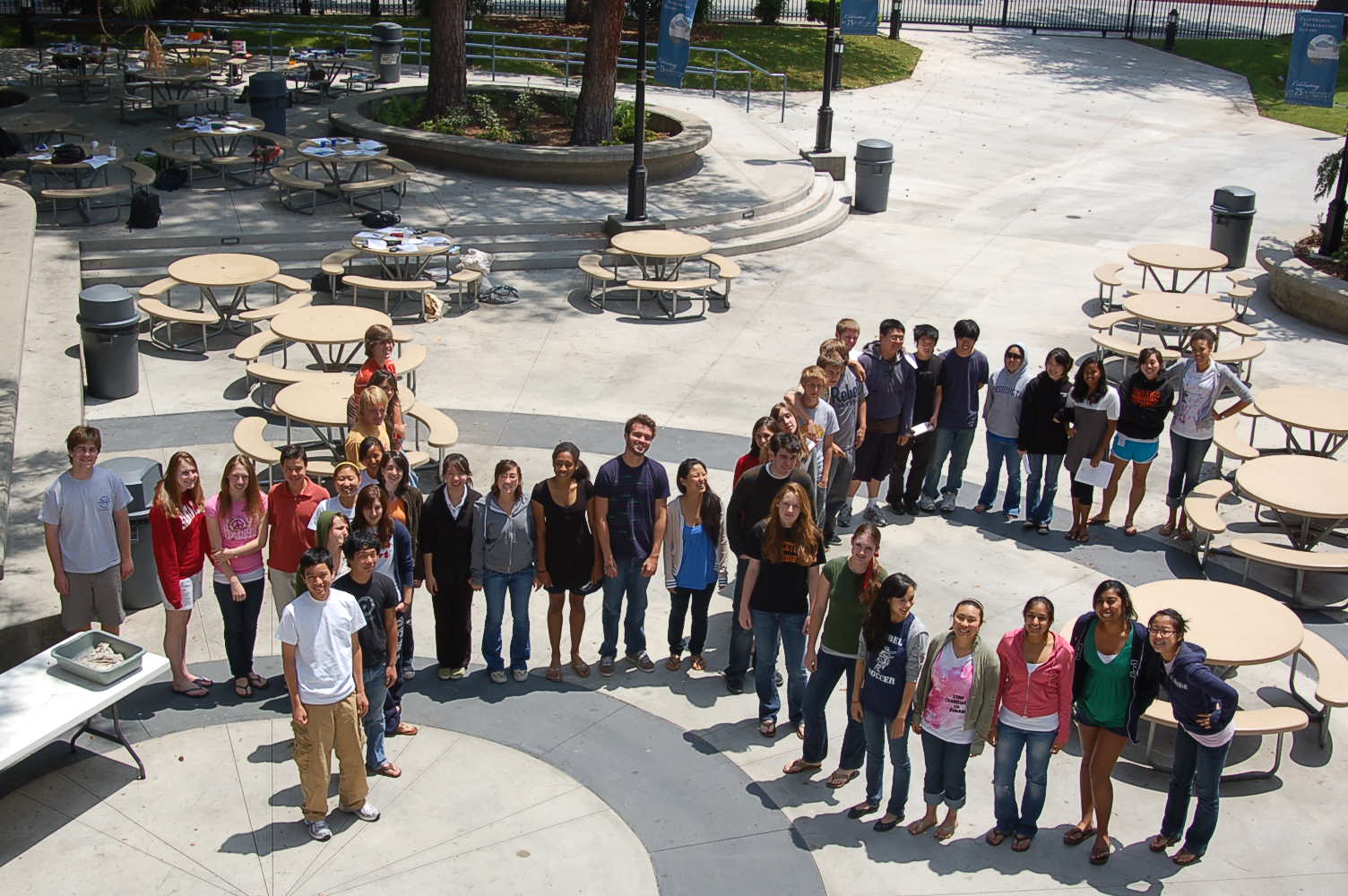
    It's AP time! And today is Calculus Day! All that work has come down to just one test. Derivatives, integrals, Riemann sums, rate of change, area of an object. Some memorization and a whole lot of problem solving. You have spent a year preparing your students and now they are on their own, hopefully with a working graphing calculator, new batteries, and a good nights sleep behind them.

    Wait a minute... Did you tell them to remember the +C? Or more importantly, will your students remember?

    For those non-Calc teachers, most answers to questions involving an integral include a +C (plus some constant). Often, this little item will earn a point for a student on the free-response section, or more accurately, a student will loose a point even if her solution demonstrates complete understanding of the math behind the question (sans the +C).

    I was constantly trying to think of ways of getting my students to remember the +C. I tried the stick; I marked a solution totally wrong if it did not include the constant. I tried the carrot; I gave bonus points to students who spotted a missing +C in class work. (Students quickly learned to game this approach.)

    A friend of mine has taken a totally different approach. He gathered all of his Calc students and took the picture below. Well Done! What a fun way to remind the students of the importance of +C.

    Tech Tags:

  • Pop!Tech Live 2007 Published 2007-10-17 under , , ,

    Pop!Tech Logo A network of remarkable people, extraordinary conferences, powerful ideas & innovative projects that are changing the world.

    If you love TED, then check out the POP!Tech conference in Camden, Maine and online. I am especially interested in listening in on the Thursday session titled "A WHOLE NEW MIND" featuring among others Daniel Pink whose book of the same title confirmed many of my values regarding education, the importance of creativity, collaboration and story. Find some time Oct 17 through 20 to watch and participate in this promising conference.

    Tech Tags:

  • Rethinking Assessment Published 2007-08-23 under ,

    As a blog reader, you don't need to be told that some of the best information comes from the discussions (comments) that follow a blog post. I read with interest Anne Davis' post on her new blogging project. But it was a particular comment (by Dean Shareski) that really caught my eye. It describe how a science class adapted a Darren Kuropatwa type class blog (link to blog). The comment also provided a link to a video where students discuss how this alternative form of assessment has impressed them.

    The video frames the conversation about "Assessment for Learning" with comments by students on how they were affected by this form of assessment. Coincidently (or not), the video's focus on students and their opinions mirrors objectives embraced by "Assessment for Learning" models. Students reflect on their next steps to be successful and gather evidence to show their learning. The role of the teacher is to provide clear expected outcomes and offer ideas on how students can demonstrate their success.

    High stakes summative assessment (assessment of learning) is getting a great deal of attention in schools (and the press). We are consumed with the need to enable our students to be successful on these (standardized) exams. As an AP teacher, I spent all of April reviewing past tests, drilling my students on a daily basis. This practice had positive results and I would not argue that we don't owe our students the tools to do well on these tests.

    My argument is that we need to form a balance between assessment of learning and assessment for learning giving more emphasis (time) to the latter. A friend of mine's sister is charged with "coaching" students who fall below a certain grade. Certainly, this program is a positive step toward the true nature of "no child left behind". But the school tabulates summative assessment scores on a weekly basis begging the question "with all of this assessment of learning, where is the time for assessment for learning?"

    As we progress as educators, rethinking assessment will be of paramount importance with traditional models being replaced by models that put the student in charge of demonstrating or providing evidence of his/her learning. Certainly, ePortfolios will play a important role in assessment.

    As a side note, does anyone know the difference between Assessment for Learning and formative learning?

    Resources

    Tech Tags:

  • Mashups for Everyone Published 2007-08-09 under , ,

    Thanks for a del.icio.us bookmark from Bud Hunt (aka Bud the Teacher), I found a very interesting article from Wired discussing the problem with social networking sites like Facebook and MySpace. In summary, these services allow users to put information into their pages but do not provide a open architecture (an API) that allows the information to flow out of the page.

    I am a big fan (if you did not already know) of open systems and APIs that allow the sharing of information between services. Admittedly, I am not a Facebook or MySpace user so I just assumed these Web2.0 pillars of social networking provided a means for sharing information outside their own platform. For my money, a defining characteristic of a Web2.0 service is the ability to share information with other services (the availability of an API). Shame on sites that shun APIs.

    The article included a side bar link to an article on how to "Replace Facebook Using Open Social Tools". This is definitely worth a read as it is a great summary of the open services that we can mashup to form interesting new sites.

    If you have never tried creating a mashup or have never used an API, use this article as a guide to get your feet wet with Open Social Tools. You will marvel how easy it is to create a sophisticated page that draws information from a number of sources. When you are done, share your work with me. I'd love to see what you create.

    Tech Tags:

  • To Err is Human, Thus the Wiki Published 2007-08-01 under

    To Err is Human, Thus the wiki
    I ran across this quote (from CNET's developers' blog) and thought that it captured one of the great reasons to use a wiki.

  • Popfly is SO cool! Published 2007-05-21 under , , ,

    This morning I came across a service/website created by Microsoft called Popfly. From the website, "Popfly is the fun, easy way to build and share mashups, gadgets, Web pages, and applications." Popfly consists online visual tools for building mashups without programming experience.

    Our team's vision is to democratize development by making it approachable to an entire class of people that want to "create" without necessarily having to write code. We believe that if you can send an email, you should be able to build and personalize your own website, mashup, social networking site, or blog.

    This project is still in an Alpha release, but it is really cool and offers wonderful opportunities for educators. The downside, it only runs on IE (6.0 +) and Firefox (2.0 +). Nonetheless, check out the Popfly screencast. You will be amazed.

    Technorati Tags:

  • Go Ahead and Yack on Your PBwiki Published 2007-04-13 under ,

    Yesterday evening, I attended a news conference of sorts held by Ramit Sethi, co-founder of PBwiki and BJ Fogg, co-founder of YackPack.  This conference was for educators and was to answer questions regarding the integration of YackPack's WalkieTalkie widget into PBWiki.  Now you can add voice chat capabilities to any wiki page allowing those viewing that page to talk with each other.  Its easy, its fun and its free.  ( link to video demonstration )

    I praised YackPack back in a December post in which I focused on asynchronous communications - the ability to leave voice messages to one or all of a group of collaborators.  But the WalkieTalkie widget is for synchronous - real time - communications.  This is such a cool tool.  It adds a whole new dimension to a web page.  As I write this post, I have a tab open to the YackPack home page which (of course) has a WalkieTalkie widget on it.  It is fun to hear the  tentative comments of folks who are browsing the YackPack site and want to give the widget a try.  I can image browsing for a book on Amazon and hearing the author ask if I have any questions about the book before purchasing.  It's a bit scary... and really cool.

    I will admit that when I first heard of the integration of the WalkieTalkie widget into PBwiki, I was a bit underwhelmed.  But the more I think about it, the more ideas of how this tool can be used to help extend the classroom.  Here are just a few ideas, most of which were discussed at yesterday's news conference.

    • Teacher posts a set of review questions for an upcoming test on her PBwiki site and then holds "office hours" during which time, students can come to the page and ask the teacher a question (or just listen to the questions from other students).  I know of a couple of teachers that do this but use IM for communications.  For me, I would find being able to explain an answer to a complex question verbally easier than using text messaging.
    • Teacher sets up several discussion pages on his PBwiki site and on each a different topic is presented.  A group of students visit a page and discuss the topic using the WalkieTalkie widget and then write up a summary of their discussion right there on the wiki page.  Optionally, the conversation can be recorded and then edited by the students.  This conversation can then be added as part of the wiki page (and be part of a podcast).  [note: at this time, you need a third-party application to record the conversation, but BJ (of YackPack) was interested in the possibility that recording become a feature of the widget in the future.]
    • A group of students from various schools (and even countries) use PBWiki to create a textbook or AP review site.  Using the WalkieTalkie widget, they can meet regularly to discuss issues that have come up while creating the wiki.
    • Teacher sets up a conference with a noted author, scientist, or public figure and uses the WalkieTalkie widget allow students to hear from and ask questions of this expert.  This conversation can even take place in the classroom where the students talk turns asking questions.  Again, students can summerize the conversation on the wiki page.

    Mixing the power of voice communication with that of visual media (text and images) is a really powerful learning tool.  I congratulate the folks at YackPack for making such a great and easy to use widget and those at PBwiki for the insight to make it really easy to include the widget on any wiki page.

    By the way, the news conference was held on a PBwiki page using the WalkieTalkie widget.  Just another use PBwiki and YackPack's WalkieTalkie widget.


    Tags:

  • PBwiki is Ad-Free for Educators Published 2007-03-09 under ,

    If you are looking for a wiki space for your class but don't want ads, PBwiki is treating educators to an ad-free wiki. When you create a wiki in PBwiki, you are asked for what the wiki will be used. Just select 'Education' and your wiki will automatically be made ad-free.

    Up to this point, this little trick was a secret that a few folks on PBwiki's Educational Advisory board shared with me. In my session at the CUE Conference last week, I passed the secret on during both of my sessions. Wednesday, I recieved an email from Ramit Sethi, the CEO of PBwiki encouraging us to spread the word. So if you are planning a wiki and are considering PBwiki, be sure to indicate that it is for educational use and it will really be free - free of cost and free of ads.

    Spread the word!

    Tags:

  • Day 12 - Assessing the Process with RSS Published 2006-12-29 under ,

    RSS - sounds technical and at first look, it is not pretty. But for my money, RSS is the biggest advance in the Internet since the graphical browser. That is a pretty big claim, so let's see how RSS can change the way you view the Web - and then let's see how RSS can play an important role in collaboration.

    For those scratching your head asking "what is RSS?", you are probably not alone. It has been my experience that many educators are not familiar with this technology, yet its presence is widespread. You have probably seen on Web pages the RSS orange in the form of an icon or chicklet . Simply stated, RSS is the technology that allows you to keep up to date on all of your favorite sites as well as news information - all from a single page. Many sites, and most of the big ones - including this blog :-) have a special URL that lists all of the new content from the site. When you collect these RSS feed URLs into a "reader", you can see what is new from all of your feeds. There are many different types of "readers" including standalone applications, browser plugins/extensions, and websites. (List of RSS Feed Readers)

    I use Bloglines - a web-based reader - to view all of my feeds. Since I use several different computers, I want my feeds to be stored remotely. You can view my feeds by clicking here. Notice that you can organize your feeds into a directory folder structure which allows you to either view a feed individually or all feeds in a folder. Thus, with one click, I can see all of my "Ed Tech" articles. No need to browse to each of the individual blogs to see if anything new is available.

    I also use Google's personalized homepage which allows me to customize my Google search page with little boxes (channels) that show the headlines from RSS feeds. While not as extensive as my Bloglines list of feeds, Google lets me keep track of those feeds in which I am most interested - e.g. ESPN's News from English Football.

    So how can RSS feeds help educators? Save time! Almost all of the tools that I have mentioned in the 12 Days of Collaboration have an RSS feed that lets you as the teacher keep track of changes to your students' projects. So, when Billy adds something to his group's writeboard (see Day 1), you will see a new item in your RSS reader since you "subscribed" to Billy's group's writeboard RSS feed.

    By subscribing to the feeds from those collaborative tools your students' are using and organizing them in a reader like Bloglines, you can monitor each group's progress. Actually, you can monitor each student's progress within each group since all of the online collaborative tools mentioned let you know who contributed what. By monitoring your students' contributions to the collaborative process, you can gain a better view into their understanding of the topics of the assignment. RSS provides teachers the opportunity to take an active role in project's lifecycle. You can offer feedback, direction, compliments, and even the gentle nudge forward when the development of the project is made so visible.

    For me, RSS enables assessment to move from being dominated by the end product to a focus on the process where the learning is more evident. You can see who is taking risks, how are decisions being made, and who is contributing what. In other words, assessing the collaboration.

    Finally

    Success with the tools that I have discussed in 12 Days of Collaboration requires that you approach collaboration differently than traditional group work in the past.

    1. When explaining the project, it is important for you as the teacher to clearly define your expectations for "positive interdependence" within the group as well as individual accountability. (Johnson and Johnson, 1999) Discuss the social skills needed for groups to be successful.
    2. Too often, teachers assign group projects and then sit back as the students work. For collaborative projects to work, teachers must "monitor students' learning and intervene within groups to provide task assistance or to increase students' interpersonal and group skills". (Johnson and Johnson, 1999) In other words, we must take an active role in each group's success.
    3. Assess student learning as well as how well the groups functioned. Provide members of the groups a chance to evaluate their group's performance, how well they worked together, and how they can improve next time. (Johnson and Johnson, 1999)
    4. Incorporate regular opportunities for collaborative learning into your curriculum. (Smialek and Boburka, 2006) Occasional group work does not provide students the opportunity to learn how to collaborate. Working in groups on a regular basis allows students to become much more proficient at collaborating, and as a result, they take away much more from the project than they would have if they were not given the opportunity to develop skills in collaborating.

    I hope that this series on collaboration will provide you with tools and motivation to develop projects that promote active learning within groups requiring collaborative skills.

    RSS Resources
    Simple RSS Tutorial
    More Extensive (and technical) RSS Tutorial

    References
    The Effect of Cooperative Listening Exercises on the Critical Listening Skills of College Music-Appreciation Students
    Thomas Smialek; Renee Reiter Boburka
    Journal of Research in Music Education, Vol. 54, No. 1. (Spring, 2006), pp. 57-72.
    Stable URL: http://links.jstor.org/sici?sici=0022-4294%28200621%2954%3A1%3C57%3ATEOCLE%3E2.0.CO%3B2-T

    Making Cooperative Learning Work
    David W. Johnson; Roger T. Johnson
    Theory into Practice, Vol. 38, No. 2, Building Community through Cooperative Learning. (Spring, 1999), pp. 67-73.
    Stable URL: http://links.jstor.org/sici?sici=0040-5841%28199921%2938%3A2%3C67%3AMCLW%3E2.0.CO%3B2-O

    Tags: , , ,

    Powered by Qumana

  • Day 11 - Chat by the Campfire Published 2006-12-24 under ,

    Yesterday, I mentioned my friend Mr. French who teaches pre-calculus and calculus (regular and AP). He like so many teachers is extremely dedicated to his students. The night before a major test, Jo makes himself available via IM (chat) so that students can ask questions. This got me thinking about the power of instant messaging. It is a preferred method of communicating among kids. As group members of a project are working at their desk, they can collaborate via IM.

    My biggest reservation about including chat (IM) as a collaboration tool has been the inability to record the conversation. As you should know by know, I feel that the power of the online collaboration tools is to help make the process of collaboration more visible to a teacher. Thus, for me to endorse IM as a collaboration tool, teachers would need to be able to "replay" the conversations.

    CampfireEnter 37 Signals' Campfire, "a web-based group chat tool that lets you set up password-protected chat rooms in just seconds". When you setup an account with Campfire, you create a URL for your chats. You can create multiple rooms to help organize your chats and only those that you want to invite can participate in chats. One of the great feature is the ability to upload files while chatting. If you upload an image file, it previews in the chat window. This is a fantastic tool for math and science courses where equations are often discussed. But the feature that I like the most is repository of chat transcripts. A teacher (or student) can look up chats based on person and/or day. One can also search the transcripts.

    The service is free but it only allows four simultaneous people chatting at one time. You can have more people registered with your chat area, but only four can be active across all of your rooms at one time. This is a bit restrictive if you are running a review session for all of your kids. But it would work if the chat area was only for a small group project. You can also upgrade your service to one of the premium plans (that costs money!).

    I am just starting with Campfire and it is working well for one of my projects where synchronous communication is necessary. I am also experimenting with Google Talk which allows both synchronous and asynchronous communication both in IM format and voice. You can also review past conversations. One restriction is that conversations are one on one, not within groups.

    I would love to hear what you are using for this type of communication.

    Tags: , ,

    Powered by Qumana

  • Day 10 - Blogging Your Class Published 2006-12-23 under ,

    Yesterday, I discussed the power of groups (forums) for creating a collaborative environment where students can respond to a message created by a teacher or student. In that post, I mentioned the similarity between blogs and groups, and indicated that one should not dwell on which is the best tool. Today, I will advocate blogging as the clear choice for capturing your class.

    bloggingI started talking about the power of blogging in the curriculum back in early '04 and I still cite the fantastic work of Darren Kuropatwa and his AP Calculus, Pre-Calculus (11) and Pre-Calculus (12) classes. Darren has his students post a summary of the topics covered in class on the class blog. One student is the "scribe" for the day and posts his/her notes on the class. This provides a wonderful documentation of the class as well as a great exercise for the scribe as he/she is asked to publicly explain what was discussed in class that day. Darren also has students reflect on the unit/chapter in "Blogging on Blogging" or BOB.

    Because the blog is public, students take the job of scribe very seriously and even try to out do other scribes. The quality of their work is outstanding and students get a kick out of knowing that others (across the globe) are reading their post.

    There are numerous sources for information on blogging, but one that I just stumbled upon is by Robert Jones - his "Blogging for Beginners" series. Robert (aka Mr. Jones) came to my attention at breakfast with a friend - Mr. French whose AP Calculus class also blogs. Apparently Mr. Jones posted a comment on the class blog, but the students thought it was just Mr. French posing as a Maths teacher from Scotland. One enterprising student verified Mr. Jones' existence and posted his research.

    There is nothing like having an international audience to motivate you to posting the best content as possible.

    Tags: , , ,

    Powered by Qumana

  • Day 9 - Google and Yahoo Groups Published 2006-12-22 under ,

    One of the oldest online tools for collaboration has been user forums where folks post questions and others post responses. Each "thread" contains the original message along with all replies ordered in a tree structure. Back in the days of CompuServe and early AOL, this was how people shared their expertise. I recall being involved in many discussions on the best way to resolve a problem posted by someone else in the Clipper forum. I learned quite a bit about the programming language Clipper by books and experimenting, but the CompuServe Clipper forum is where I mastered my understanding. The value of this learning tool came from both having questions answered by others in the forum, but also by answering questions. Teaching a concept really does make us learn it.

    Google and Yahoo bring these user groups into the 21st century by improving the user experience - making it more accessible. The user-friendly experience begins with the ease of which it is to create a new group and manage the groups settings. Once created, posting new messages, replying to existing messages, and finding message threads is very easy.

    groupsBoth Google Groups and Yahoo Groups offer similar configuration settings. Though only some of these are available to you when you initially setup your group, you have access to all of the settings from the "manage group" page. Some of the more important settings include:

    • Access Levels - who can view, and post messages to your group
    • Membership - who can join the group (anyone, moderated, or invitation only)
    • Visibility - are the messages in the group included in search engines and is the group listed in a directory of groups (and by what category)
    Again, both Google Groups and Yahoo Groups offer similar basic forum (group) functionality. Yahoo offers extras such as polls, databases, and calendars integrated into your group, though I have never used any of these. Google Groups - Beta improves on the look and feel of Google Groups and gives you more control on customizing the look and feel.

    How might you use forums (groups) in our world of education? There are numerous ways you can enhance your curriculum by incorporating forums into your class. You can use it as a way for students to ask and answer questions; you can post discussion questions; you can use it as a review tool where students answer questions that you have posted and even correct other students' answers.

    So far in the 12DaysOfCollaboration, we have been focusing on how these tools can be used to enhance collaborative projects in class. Let us not forget collaboration among teachers. Forums are a great way for teachers to get and give help on a variety of topics. AP teachers should all be participating in their subject's Electronic Discussion Group. When I was teaching AP Computer Science and AP Calculus, these groups were a valuable part of my professional development and directly contributed to my students' success.

    The great thing about forums (groups) is that they allow you to reply to replies; in other words, your discussion can branch out into separate directions. I have often been asked which tool is better for collaboration, blogging or forums. While similar in structure, there are two major differences. First, all comments in blogging are treated equally. While one can make a comment about a comment, this message is not treated (organized) any differently than other comments. When a person replies to a reply in a forum, a new branch of the discussion is created. (Note: some blogging software is now allowing this more structured commenting - replying to a comment.)

    The second, and most important for me, distinction between blogs and forums is in the significance of the first (original) post. In general, blog posts can stand on their own whereas in forums, the messages are designed as the start of a thread. There are forums where the messages are more just announcements and blogs where the posts are questions and the meat of the post lies in the comments. On Alan November's blog, the posts are usually in the form of a question. The real value of the site lies in the comments. I would argue that this type of blog would be better run in a forum, though I understand that there are other considerations that might direct Alan to using a blog.

    Both blogs and forums are fantastic collaboration tools and you should not dwell too long on which is the one that would best suit your needs. I just wanted to (re)introduce you to the tried and true forum - now groups - idea. They are easy to setup, manage and use, and have a long history of providing educational value.

    Tags: , , , ,

    Powered by Qumana